
Vexa: AI Video & Photo Maker
Clicker TechnologyLifestyle
3.79.00 Reviews
- Version
- 1.0.1
- Installs
- 100.00K
- Age Rating
- Mature 17+
Screenshots
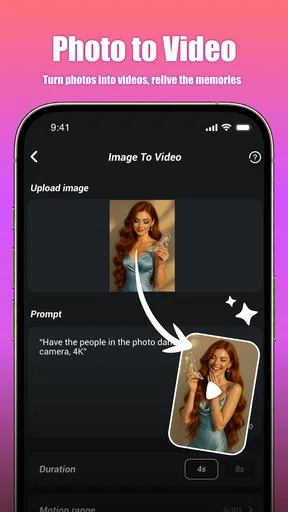
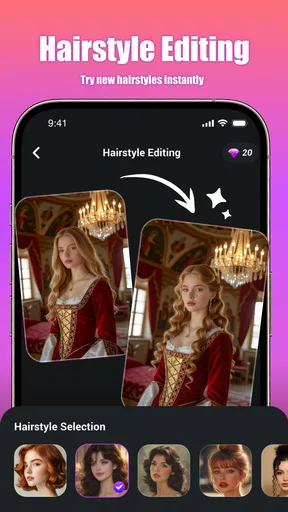
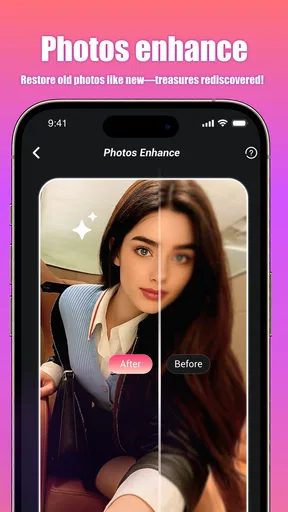
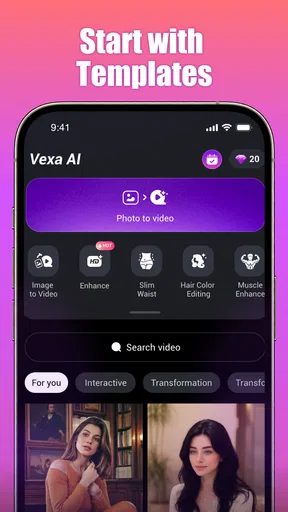
Our Review of Vexa: AI Video & Photo Maker
 Analysis by Appyee
I tried Vexa: AI Video & Photo Maker as the kind of app you open when a still image feels too static for a post, message, or personal project. Its basic idea is easy to understand: start with a photo, add AI-generated movement and a visual style, then turn the result into a short video. That immediate transformation is the reason it can feel exciting during the first few sessions.
Vexa comes from Clicker Technology and sits in the lifestyle side of the app world rather than presenting itself as a full professional editing suite. It is free to install, although its in-app purchases range from $0.99 to $99.99 per item. The app carries a Mature 17+ rating, so I would not treat it as a casual child-focused creative tool. It runs on Android 7.0 or later, and the current version is 1.0.1.
My overall impression is mixed in a useful way. Vexa is good at creating a quick sense of movement from an ordinary picture, especially when I want an idea rather than a carefully edited production. The harder question is what happens after the novelty wears off. An AI effect can be entertaining once, but a lasting app needs to fit naturally into a routine. Vexa has some potential there, yet it also asks me to keep supplying suitable photos and fresh reasons to animate them.
What the first week with Vexa feels like
The first-week appeal comes from the short distance between an image in my gallery and a finished-looking moving clip. I do not need to begin with a timeline, a collection of clips, or a detailed understanding of video editing. A single photo is the starting point, which makes the app approachable for someone who normally avoids editing software.
The most satisfying results are pictures with a clear subject and enough visual separation between the foreground and background. A portrait, a pet looking toward the camera, or a travel photo with a strong central object gives the motion a better chance of feeling intentional. A cluttered image can still be worth trying, but the effect may look less convincing because there is no obvious visual focus for the animation to emphasize.
I found it helpful to think of the app as a way to create a mood, not as a tool for reconstructing a complete scene. The cinematic motion and creative effects are most useful when they add atmosphere to an already interesting image. They are less useful when I expect the app to invent a coherent story, preserve every tiny detail, or replace the control available in a conventional editor.
A practical first-week routine would be to choose three very different photos instead of repeatedly testing one image. I would use a close portrait, a landscape, and a simple everyday object. That gives a better sense of where the app suits my own material. It also prevents a common mistake: assuming a weak result is always the app’s fault when the source photo may simply be a poor match for animated treatment.
The first useful lesson is to select for composition before selecting for effect. When the subject is easy to read, the transformation feels more deliberate. When the frame is already busy, adding movement can make it feel noisy rather than cinematic. This is a small change in workflow, but it saves time and makes the early experience more rewarding.
Vexa is also easier to appreciate when I keep the intended destination in mind. A short animated image for a private message has different expectations from something I want to publish as a polished social post. For a quick personal reaction, a slightly unusual result can be charming. For public sharing, I become more sensitive to awkward motion, repetitive effects, and whether the finished clip actually says something beyond “this photo moved.”
The app’s free entry point matters during this stage because it lets me explore before deciding whether the experience deserves payment. However, I would approach any purchase carefully. The wide range of possible in-app purchase amounts means the cost can be minor for one person and significant for another. I would first identify how often I genuinely use the creations, rather than paying simply because the first few results are fun.
Where the early novelty works best
One realistic use case is a family group chat. Imagine taking a still photo from a birthday, animating it, and sending a short moving version instead of another static image. The value is not professional quality; it is the small surprise of giving a familiar memory a little motion. The same idea works for a pet photo, a holiday snapshot, or a picture saved because it has a strong emotional moment.
Another use is preparing a visual prompt for a larger project. I might animate a still image to test whether a concept has enough atmosphere before spending time in a more advanced editor. If the movement makes the image feel more alive, I have learned something about the direction. If it looks distracting, that is also useful feedback.
For creators who publish frequently, Vexa may help break a run of static posts. A photo that would otherwise stay in the camera roll can become a quick experiment. Still, I would not confuse that convenience with a complete content workflow. The app is better at generating a starting point or a lightweight finished piece than at managing a detailed production from planning through final polish.
There is a social side to the Mature 17+ rating as well. I would be thoughtful about the photos I upload and the people shown in them, particularly when transforming images of friends, family members, or strangers. Even when the result is harmless, changing someone’s appearance or movement can be uncomfortable if they did not expect it. That is not a reason to avoid the app, but it is a reason to keep consent and context in mind.
What remains useful after the first month
After the initial excitement, the central question becomes whether I can build a repeatable habit around Vexa. In my experience, the answer depends on how often I collect photos that already have a reason to exist. If my gallery contains portraits, trips, pets, objects, or visual ideas that I regularly revisit, the app has a steady supply of material. If I rarely take pictures or only want one special animation, it can quickly become an occasional novelty.
The strongest long-term role is as a lightweight finishing step. I can take a photo I would normally share unchanged, test a motion treatment, and decide whether the animated version communicates the feeling better. This is more sustainable than opening the app without a purpose and scrolling through effects until something looks interesting.
I would also use it for small personal archives. A set of animated images from a trip could make a more engaging private recap than a folder of stills. The key is restraint: not every photograph needs movement. If every image receives an effect, the distinctive moments lose their impact and the process starts to feel like maintenance rather than creativity.
That trade-off separates Vexa from a standard photo editor. A conventional editor is usually valuable because I can make precise, repeatable adjustments such as cropping, correcting light, or organizing a consistent visual style. Vexa’s appeal is more expressive and immediate. It changes the character of an image rather than simply improving its technical qualities.
Compared with a full video editor, Vexa is more approachable for one-photo experiments but less suitable when I need exact timing, layered sound, multiple scenes, or detailed control over every movement. I would choose a conventional editor for a planned video and Vexa for a quick visual idea. Neither completely replaces the other, and trying to force Vexa into the role of a professional timeline editor would create unnecessary frustration.
Compared with leaving a photo untouched, Vexa offers a way to make a familiar image feel new. That is its clearest recurring value. The benefit is strongest when the image has emotional importance but does not yet have a natural format for sharing. A small amount of motion can turn a forgotten picture into something I want to send or revisit.
There is also a useful decision rule for purchases. I would wait until I had used the app across several different occasions, not just one enthusiastic evening. If I still open it whenever I have a suitable photo, a small purchase may make sense for my habits. If I only return when a new effect catches my attention, paying for more options may increase the collection of unused possibilities rather than the app’s real value.
How to make the workflow last
I would keep a small “animation candidates” album on my phone. Instead of searching through the entire gallery every time, I could save images with a clear subject, interesting lighting, or a strong emotional connection. This turns Vexa from a random-effects app into a deliberate step in a personal creative routine.
I would also compare the animated version with the original before sharing it. The question is not whether the result is more active, but whether it is more effective. If the movement distracts from a face, changes the feeling of a place, or makes a meaningful memory look artificial, the still image may be the better choice.
A third useful habit is to keep the effect aligned with the image’s purpose. A calm landscape benefits from a different treatment than a playful pet photo. Even without treating the app like a professional editor, choosing with intention makes the result feel less random. This is where Vexa can reward judgment more than constant experimentation.
For people who want to share often, I would create a simple rotation: one personal memory, one visual experiment, and one everyday image. That prevents the feed from becoming repetitive and helps reveal whether the app genuinely expands what I create. If all three categories begin to feel interchangeable, the long-term value is probably declining.
The maintenance burden and the points that cause fatigue
Vexa’s maintenance burden is not about complicated project management. It comes from the repeated decisions around source images, effects, and whether each result deserves to be kept. The app makes creation feel quick, but quick creation can produce a large number of disposable clips. Over time, I may spend more energy sorting and judging results than enjoying them.
That is the first source of fatigue: the gap between making something and making something worth keeping. A moving image is not automatically more meaningful than a still one. If I open the app without a clear purpose, I can end up testing variations that feel different technically but say the same thing creatively.
The second source is inconsistency between photos. An effect that looks appealing on one portrait may not suit a wide landscape or a picture with several people. This means I cannot rely on one favorite approach for every situation. The need to match the image to the treatment is part of the creative process, but it also adds friction for anyone hoping for one-tap results.
The third issue is expectation. The store summary presents a simple promise of turning photos into AI videos with cinematic motion and creative effects, and that is a useful description of the concept. In practice, I would still judge each output as an interpretation rather than a guaranteed improvement. The more specific my desired result, the more likely I am to prefer a tool with manual controls.
Storage and organization can become another concern in ordinary use. Short clips are easy to create and easy to forget, especially when several versions come from the same photo. I would save only the strongest result and remove experiments that have no future use. That small cleanup habit keeps the app from becoming a drawer full of nearly identical animations.
The pricing structure also affects fatigue. A free app is easy to try, but in-app purchases from $0.99 to $99.99 per item create very different expectations depending on what I want to do. I would avoid making a purchase while chasing one unusually good result. A better test is whether the app has become part of a repeated workflow and whether the payment clearly supports that workflow.
Its audience size suggests that Vexa has attracted meaningful attention, with over 100 thousand installs and an average rating of 3.7 from around 1.4 thousand ratings. I read that as a sign of interest rather than a guarantee of a smooth experience for everyone. The small review count shown alongside those ratings makes me place more weight on my own trial with representative photos than on a quick glance at the score.
Because the app is still at version 1.0.1 and released on May 22, 2026, I would expect the experience to be judged partly on how well it settles into a routine over time. For me, that means watching whether the creative process stays dependable and whether the app continues to feel useful after the first burst of experimentation. I would not build an important production pipeline around it without testing it repeatedly first.
Who should use it and who should skip it
I would recommend Vexa to someone who wants quick visual experiments from personal photos, enjoys playful editing, and does not need frame-by-frame control. It is especially appealing if the goal is to make a message, memory, or social post feel more alive without learning a complicated editor.
I would be more cautious recommending it to a photographer who wants exact preservation of a carefully composed image. The app’s value comes from transformation, so anyone protective of the original character of a photograph may prefer a traditional editor. I would also point professionals toward a tool with stronger control when the final result must match a precise brief.
It may not be the right choice for someone looking for a complete photo organizer, a long-form video editor, or a dependable way to produce many consistent clips in a fixed visual style. Vexa can support those activities at the idea stage, but it does not replace the broader workflow. Choosing it makes the most sense when its narrow strength is exactly what I need.
Parents should also pay attention to the Mature 17+ age rating before installing it on a shared device. That rating is an important part of deciding whether it belongs in a family environment, regardless of how simple the creative concept appears.
My long-term verdict on Vexa
Vexa earns a place on my phone when I treat it as a selective creative tool rather than an automatic upgrade for every photo. Its best moments come from giving a meaningful still image a little motion, testing an idea quickly, or adding variety to a personal stream of visual posts. Those are real uses, not just novelty.
Its lasting value is less certain for people who need frequent, predictable output. The app depends on having suitable images, choosing effects with care, and resisting the urge to animate everything. The results can be enjoyable, but the process asks for ongoing judgment. That is manageable in a small personal workflow and tiring in a high-volume one.
I like the fact that the free entry point makes exploration easy, but I would keep spending controlled until the habit proves itself. The broad purchase range means I would not assume that every desirable option is equally worthwhile. My advice is to use the app for several real situations, keep track of which creations you actually share, and pay only if that pattern continues.
In the end, Vexa: AI Video & Photo Maker is most convincing as a bridge between a still photo and a quick expressive video. It is not the app I would choose for precise editing, organized production, or a serious replacement for a full video suite. I would keep it installed if I regularly enjoy turning personal images into small visual moments, but I would remove it from my routine if the results start piling up without being watched or shared.
My recommendation is therefore conditional but positive: try it if you want low-friction AI motion and are comfortable evaluating each result on its own merits. Give it a clear role, keep the source images intentional, and treat purchases as a response to a proven habit rather than to first-week excitement. Used that way, Vexa has a reasonable chance of lasting beyond the novelty phase.
Verdict
Strengths of Vexa: AI Video & Photo Maker
- Quickly creates videos and images from simple text prompts.
- Includes templates for social posts, reels, and short-form content.
- AI tools can help users without advanced editing experience.
- Useful for generating creative ideas and visual variations.
- Supports fast editing workflows for sharing content online.
Limitations of Vexa: AI Video & Photo Maker
- AI results may vary and sometimes require several prompt attempts.
- Some advanced features may be restricted to a paid subscription.
- Generated visuals can contain odd details or inconsistent elements.
- Export quality and available formats may depend on the chosen plan.
- Regular use may require a stable internet connection and cloud processing.
Similar Picks in This Category
View All
SmartThings
Samsung Electronics Co., Ltd.4.6

Google Home
Google LLC4.0

Pinterest4.2

Astrotalk - Talk to Astrologer
Astrology & Horoscope4.7

My Verizon
Verizon Consumer Group4.5

Samsung Wallet (Samsung Pay)
Samsung Electronics Co., Ltd.4.1
Frequently Asked Questions
What is Vexa: AI Video & Photo Maker used for?
Vexa: AI Video & Photo Maker is designed for creating short AI-assisted videos, animated images, and social-media-ready visual content. After exploring its editing workflow, the app feels aimed at users who want quick results without advanced video-editing knowledge. Depending on the available tools, you can typically start with photos, apply creative effects or templates, add music and text, and export a finished project for sharing.
Does Vexa require advanced editing experience?
No, Vexa is generally built around a simple, guided editing experience rather than a professional timeline with complicated controls. The interface makes it easier to choose a template or effect, import media, preview the result, and make basic adjustments. However, users looking for detailed color grading, frame-by-frame editing, or extensive audio mixing may find the app more limited than a full professional editor.
Is Vexa: AI Video & Photo Maker free to download and use?
The app may be available to download for free, but some features can be restricted behind in-app purchases or a subscription. Premium effects, AI tools, export options, templates, or removal of branding may depend on the plan offered in your region. Before starting a trial, carefully check the price, renewal terms, and cancellation method shown on the App Store or Google Play.
Can videos and images created in Vexa be shared on social media?
Vexa is primarily suited to creating content for platforms such as Instagram, TikTok, YouTube Shorts, messaging apps, and other social networks. Export quality, aspect-ratio options, resolution, and possible watermarks can vary according to the selected tool or account level. It is worth previewing the final project before publishing, especially when using AI effects that may alter faces or image details.
What should I know about privacy when using Vexa’s AI features?
AI photo and video tools may require you to upload images or videos to the developer’s servers for processing, so privacy should be considered before using personal or sensitive material. Review the app’s privacy policy to understand how media is stored, processed, and deleted. Avoid uploading confidential documents or another person’s image without permission, and check the requested device permissions before granting access.
